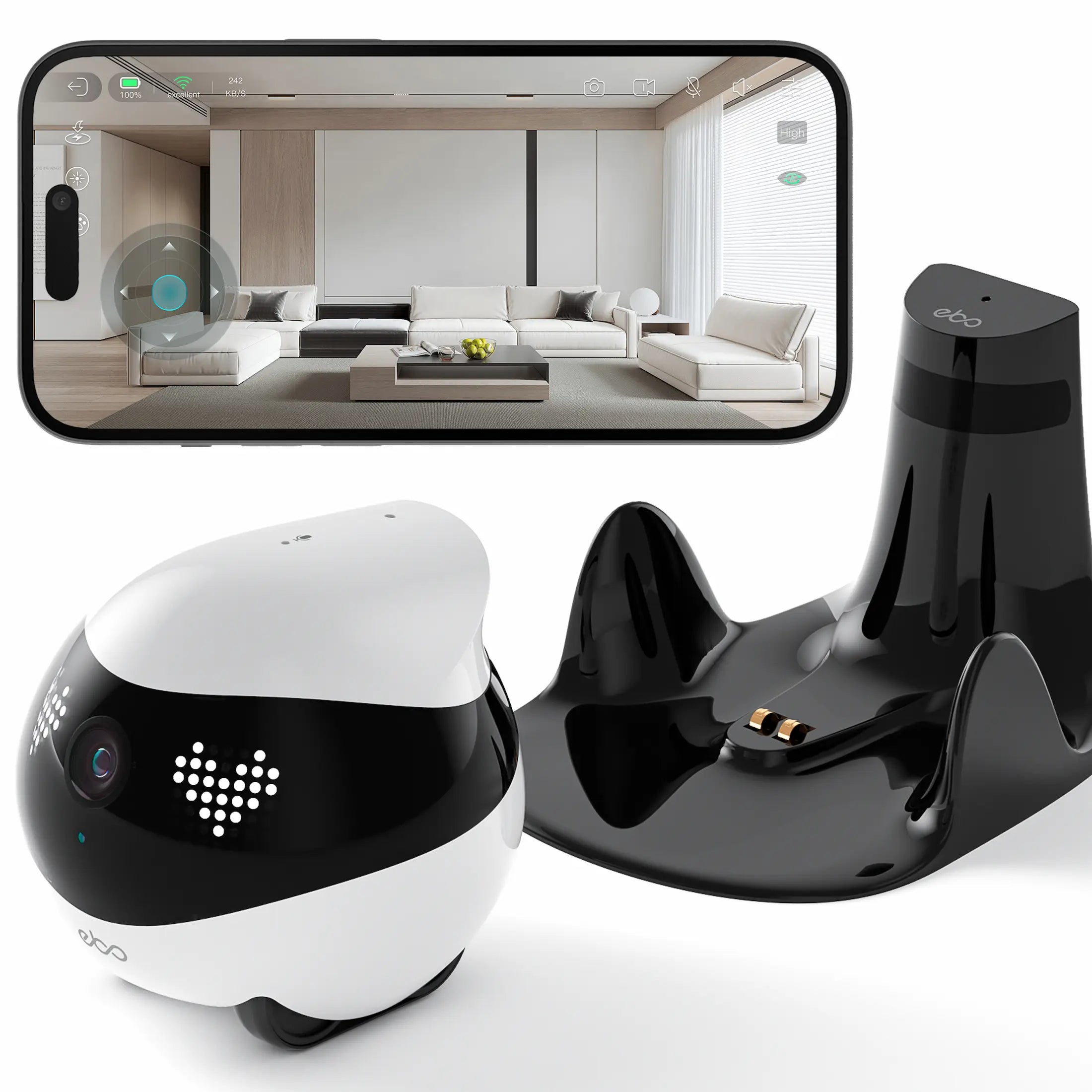
Enabot EBO Air 2
EBO Air 2 adds a 2K camera, motion alerts, scheduled recording and automatic docking to Enabot’s compact mobile-camera format.
#ad · Paid linkDecision in 30 seconds
Is this the right model for you?
Four exact-model points to review before opening the complete technical record.
Ideal for
EBO Air 2 suits pet monitoring and scheduled home checks on one protected floor whose transitions fit its low obstacle limit.
Why choose it
2K 2304 × 1296 camera with night viewing and motion alerts.
Avoid it if this does not work for you
Its verified obstacle limit is only 6 mm and its verified slope limit is 4°.
Main limitation
A motion alert is not the same as professional monitored security.
Practical ownership plan
From the first setup to the weekly routine
EBO Air 2 adds 2K video, motion alerts, scheduled recording and automatic docking to Enabot’s compact format. Its mobility remains limited to low transitions on a stair-safe floor.
This plan translates the verified exact-model record into concrete steps. It is not a RoboStead hands-on test and does not replace the manufacturer’s safety or care instructions.
Open the setup, routine and pre-purchase questions6 practical steps · 3 FAQ
Before the first run
- Build a stair-safe low-threshold zone
Block open stair edges and measure every transition. The documented limits are 6 mm for obstacles and 4° for slopes, which can exclude ordinary room dividers.
- Give auto-docking a repeatable route
Place the dock against a stable wall with a clear approach, then supervise returns from the rooms you expect the robot to monitor before scheduling unattended activity.
- Tune motion and recording settings
Configure motion alerts, scheduled recording and camera access around the real household routine so normal pet activity does not create constant unusable notifications.
Routine to plan
- Clean lens, wheels and dock contacts
Wipe the 2K lens and night-view area, remove hair from the wheels and keep docking contacts clean so image quality and automatic charging remain dependable.
- Review motion alerts for usefulness
Adjust schedules or sensitivity when normal activity produces noise. A smaller set of meaningful alerts is more useful than a full day of ignored notifications.
- Maintain local microSD storage
Confirm that scheduled recordings are written to the supported card, remove unnecessary footage and replace storage that develops errors.
Questions before buying
Can EBO Air 2 replace professional security monitoring?
No. Motion alerts and remote video are useful household tools, but they do not provide certified emergency monitoring or guaranteed response.
Does it recharge automatically?
Yes, when the dock and approach are compatible. Test returns from the actual monitoring area before depending on auto-charging.
What does Air 2 add over EBO SE?
It raises video to 2K and adds motion alerts and scheduled recording while keeping automatic docking and local microSD storage.
Verified facts
What the reviewed evidence establishes
- Camera
- 2K · 137°
- Battery
- 4–7 hours
- Threshold
- ≤ 6 mm
- Slope
- ≤ 4°
- Auto charge
- Yes
- Reviewed price
- CA$239.99 Prime price on August 27, 2026
What stands out
The useful differences
- 2K 2304 × 1296 camera with night viewing and motion alerts.
- Automatic docking with route memory and infrared guidance.
- Local microSD recording up to 256 GB.
Decision checks
Before choosing this exact model
- Its verified obstacle limit is only 6 mm and its verified slope limit is 4°.
- A motion alert is not the same as professional monitored security.
- Keep open stair edges physically blocked.
Independent research record
Specifications documented
This assessment cross-checks the exact Canadian identity, official documentation, compatible parts and purchase constraints. A manufacturer claim, an independent measurement and an owner report are never presented as the same kind of evidence.
What is established
- 6 exact-model facts are published with their limits visible.
- 1 official source(s) can be opened from this record.
- An exact Canadian buying route is identified at Amazon.ca.
What remains uncertain
- RoboStead has not measured cleaning, navigation, noise, battery life or long-term reliability in its own laboratory.
- 2 purchase decision check(s) remain visible instead of being estimated.
- Repeated owner complaints are added only when the exact model and the pattern can be documented; isolated anecdotes are not converted into facts.
Ownership reality
- Coverage limits: Stairs, thresholds, closed doors, dark rooms and floor clutter define where a mobile camera can actually patrol.
- Privacy and storage: Separate local recording, cloud storage, remote viewing and subscription requirements before accepting an indoor camera on wheels.
- Useful autonomy: Auto-docking is valuable only if navigation, patrol scheduling and notifications still work reliably in the intended rooms.
Before you buy
Check for your home
Exact packageMatch the model and included accessories
Canadian coverageConfirm the seller and warranty
Current termsCheck price, stock and returns
Verification
Official sources
Record history
What was checked in this edition
- Evidence review
- 2026-08-31
- Published facts
- 6
- Official links
- 1
- Canadian buying route
- Verified · Amazon.ca
Your next step
Move from this record to a confident decision
6 facts are verified for this exact model. Compatibility still depends on your space, routine and constraints.